Run a replicated field trial from first idea to finished season in one place. Define the treatments you are testing, schedule what happens across the season, lay the plots out on a real field, randomise to a recognised statistical design, and generate the dated field jobs the trial needs — all without leaving FarmDataViewer.
One trial, three independent layers
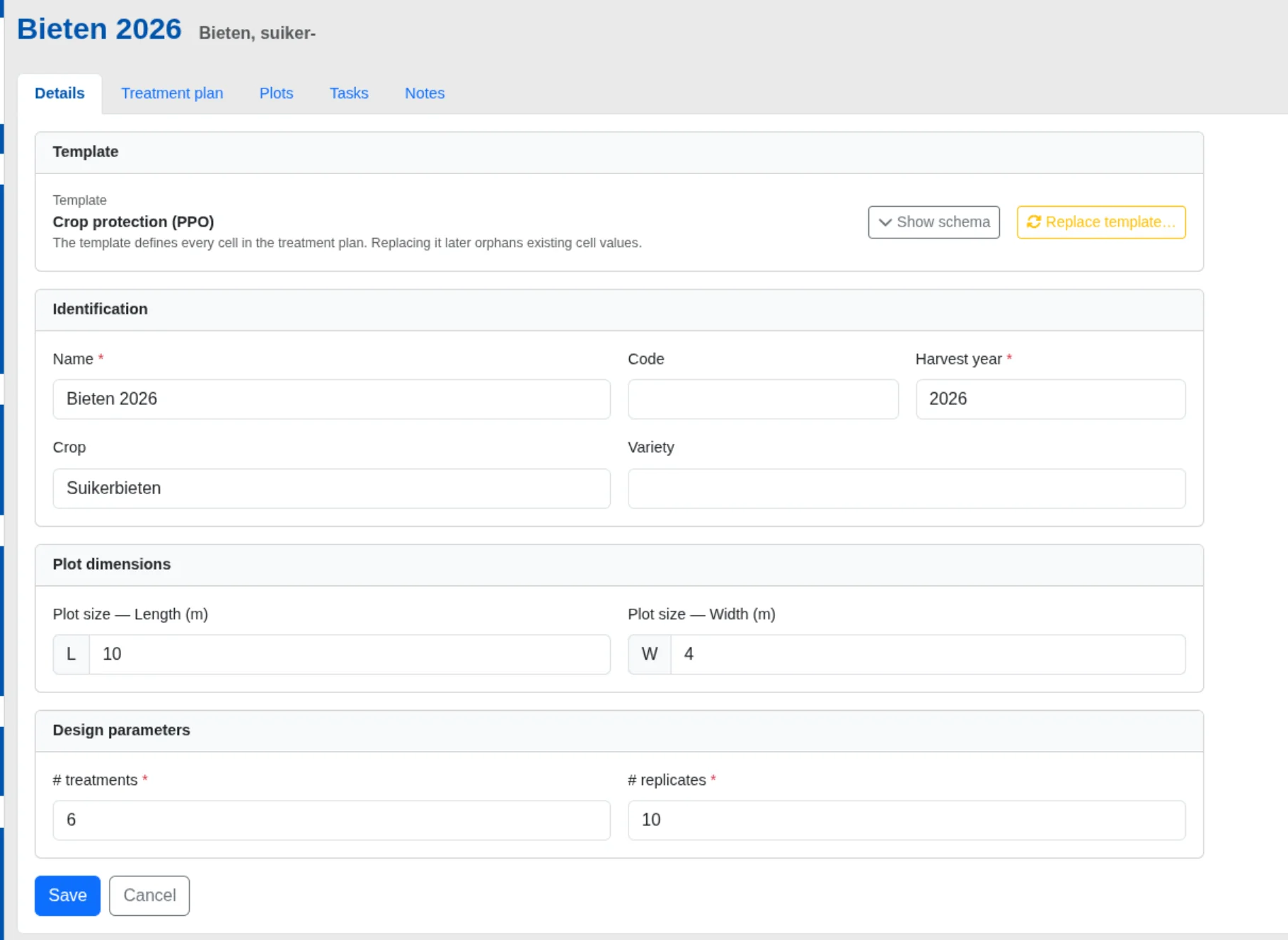
The Trial Field Manager keeps three concerns deliberately separate, so you can work in whatever order suits you. The treatment plan captures what you are testing and when you act on it; the plots capture where each treatment sits on the field; the generated work ties the two together. Because they are independent, a plan can be authored before a single plot is drawn, and plots can be redrawn without disturbing the plan. Start a trial from any field, set its crop, varieties, plot size and the number of treatments and replicates, and the rest of the workspace unlocks.
- Treatments (what you compare), moments (when you act) and replicates (spatial repeats) as three clear dimensions
- Choose a data template per trial — product, dose, water volume, nozzle and more
- Full control for researchers; read-only access for field engineers
Design the treatment plan as a matrix
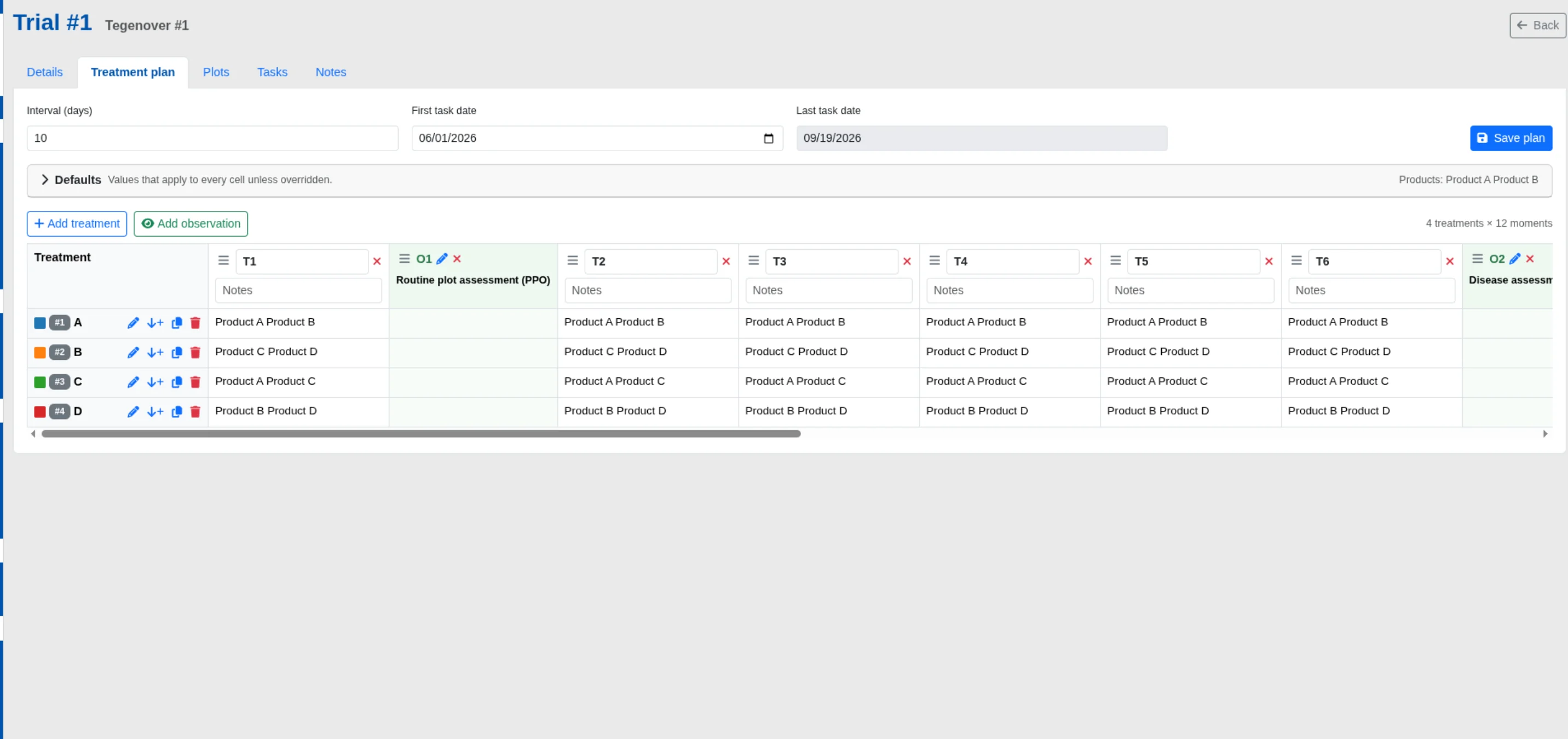
The treatment plan is a spreadsheet-like matrix: treatments run down the rows, the moments of the season across the columns. Fill common values once as plan-wide defaults and only enter the exceptions per cell. Moments come in three kinds — timed treatment applications whose recipe differs between treatments, whole-trial observations, and whole-field operations such as sowing and harvest. Because trial protocols are repetitive, you can copy one treatment’s whole recipe onto another, forward-fill a value into later timings, or copy a single cell across a row, a column or the whole matrix. Give the plan a first date and an interval and the timeline schedules itself; an untreated control is simply a treatment whose cells are left empty.
- Schema-driven cell editor with inherited defaults shown as hints
- Reorder, rename, duplicate and assign a responsible person per moment
- Additive date generation that tops the plan up and never removes existing moments
Lay out the plots and randomise
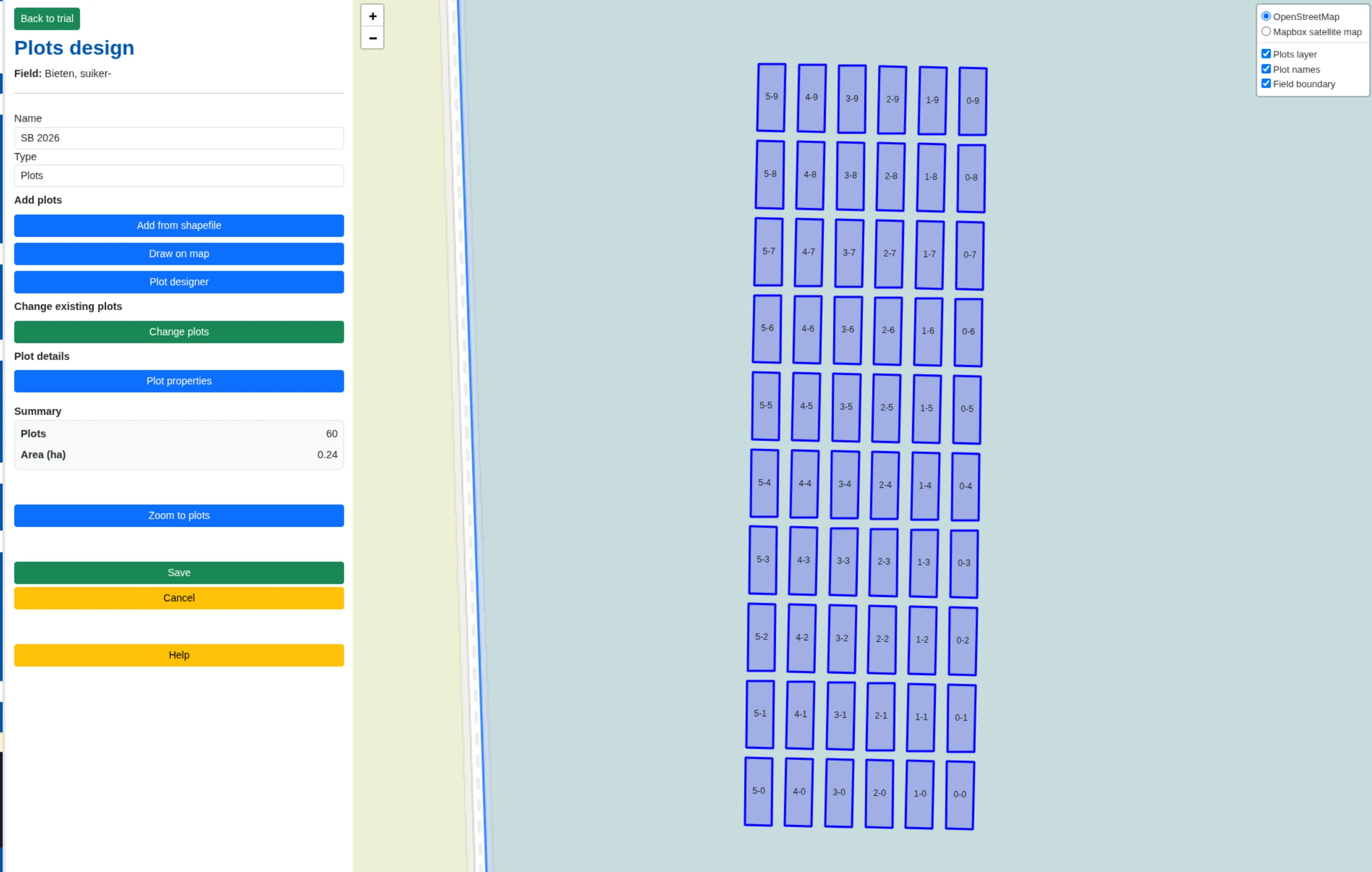
Place plots on the field map three ways: draw them by hand, import a shapefile, or generate a parametric grid — set the plot size, rows, columns and gaps, then drag and rotate the grid into position on the field. When you save, the trial’s block count, plot dimensions and plot links stay in step automatically. With plots in place, randomise treatments to a Randomised Complete Block Design (RCBD) — each block receives every treatment exactly once — or an optional Latin rectangle that additionally avoids a treatment repeating in the same position across blocks. Every randomisation is genuinely new yet reproducible from its stored seed, and if the drawn grid does not match your declared counts you are warned before anything is overwritten.
- Draw, import or generate plot geometry, then reshape individual plots
- RCBD and Latin rectangle designs, with a clear note whenever a constraint is relaxed
- Colour plots by treatment or crop, and assign a crop and variety per plot
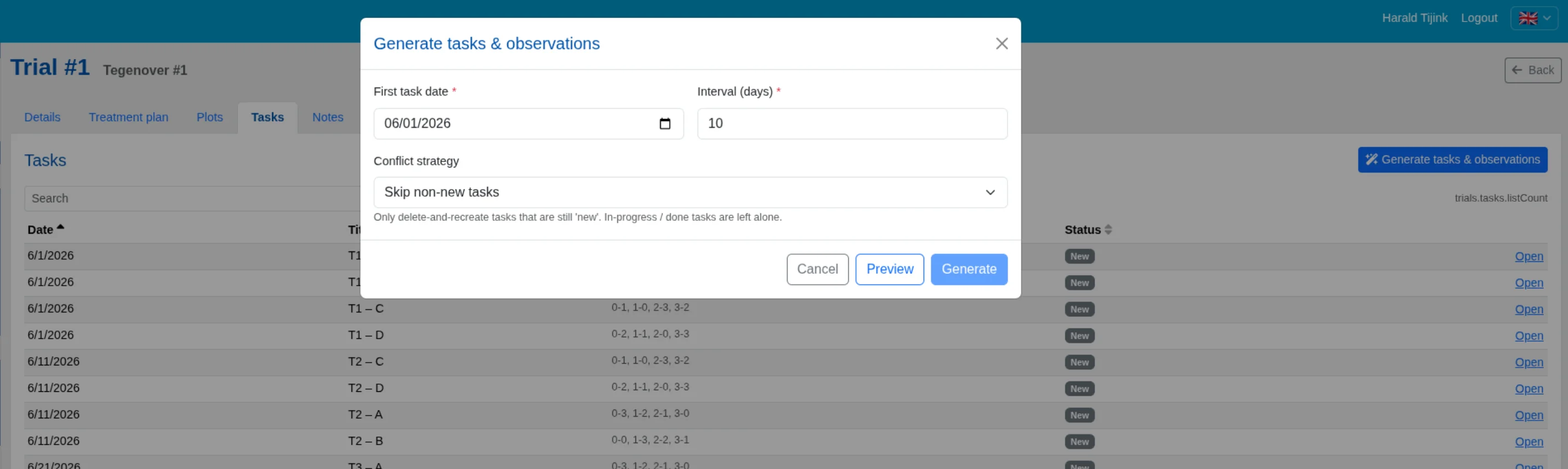
Generate the season’s work in one step
When the plan and plots are ready, one generation step turns the plan into concrete, dated work: each treatment application becomes a job on every plot that carries that treatment, with its recipe; each observation becomes an assessment with a sub-item per plot; each field operation becomes a whole-field job. A preview dry-run tells you exactly how many jobs and observations will be created, over what date range, and how many would be skipped, before anything is written. You choose how to handle work that already exists — skip what is underway, overwrite only what has not started, or abort on any conflict — so regenerating is always safe and repeatable.
- Preview before you commit — no surprises
- Conflict-safe regeneration with a guarded delete-all
- Everything lands as ordinary FarmDataViewer jobs and observations
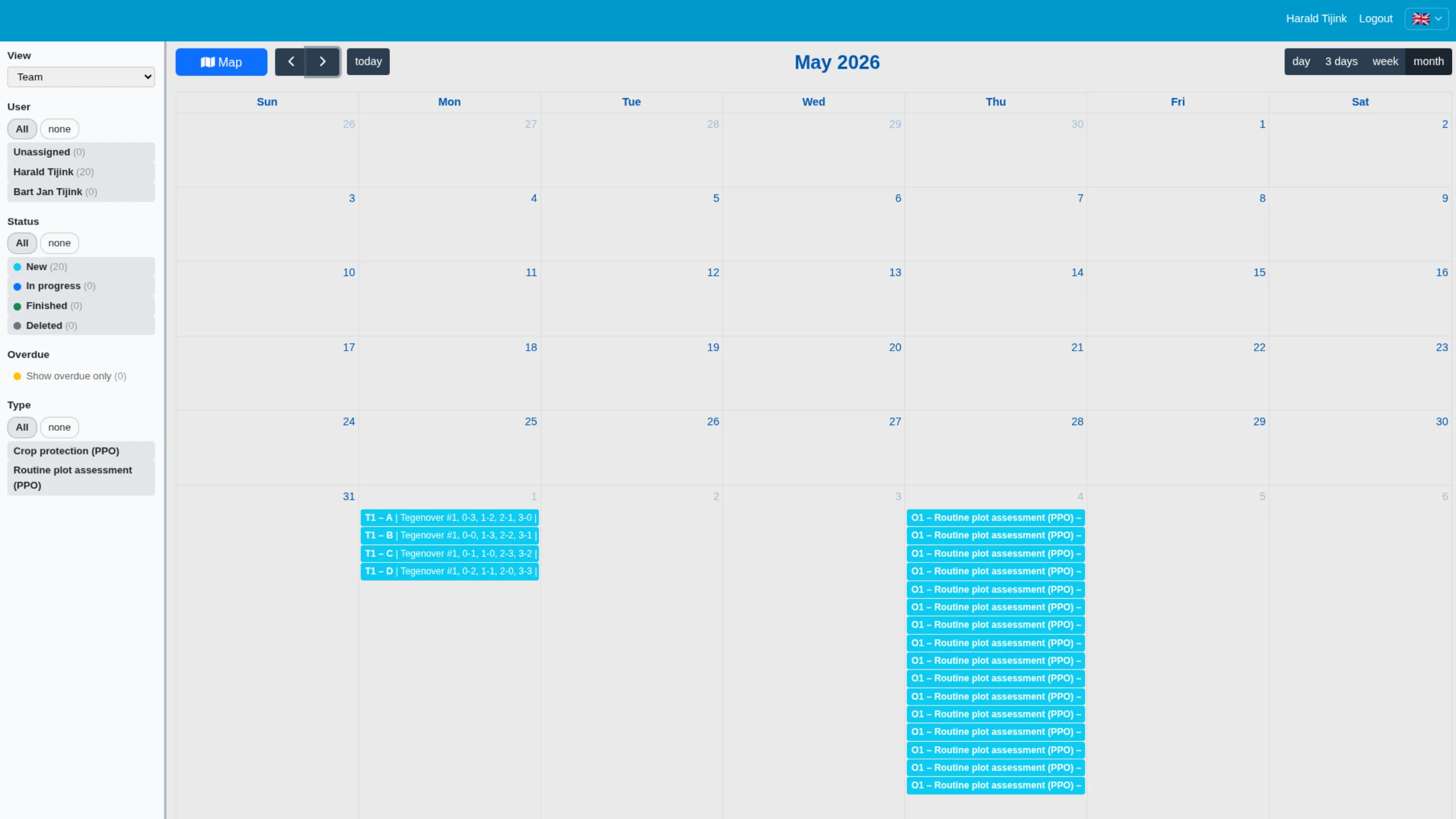
Follow the trial through the season
The generated jobs and observations appear in the normal task list, calendar and observation screens, so recording results is business as usual — on desktop or in the mobile app, where mobile plot navigation guides you plot by plot and colour-codes each plot by status. Dedicated Field operations and Observations tabs list the trial’s work with count badges, are searchable and sortable by date, title, assignee or status, flag overdue items, and open straight into the underlying job. The responsible person you set on each moment carries through to the work, and every item is dated automatically. When you head into the field, print plot labels sized small, medium or large — each showing the treatment code, replicate number and the plot and field names.
- Overdue highlighting across field operations and observations
- Record results on desktop or in the mobile app
- Printable plot labels, ordered by treatment and replicate
How a trial comes together
Plan
Build the treatment × moment matrix — what you test and when you act on it.
Lay out
Draw, import or generate the plots on your real field.
Randomise
Assign treatments to plots with a reproducible RCBD or Latin rectangle design.
Execute
Generate dated jobs and observations, then record results as the season runs.
The Trial Field Manager is part of the Field Trial package and is enabled per organisation. Contact us for availability, or return to the field trials overview.